
Download 7Canaries Standard – audio converter, MIDI conversion, music production, real-time recording, audio to MIDI
Overview
7Canaries Standard is a mobile application designed specifically for audio conversion, with a primary focus on transforming various audio file formats into MIDI data. This tool is particularly valuable for musicians, composers, and sound designers who need to extract musical notes and sequences from existing audio sources. The app supports a wide range of input formats, including MP3, WAVE, and audio CDs, making it accessible for users working with legacy or contemporary audio files. By converting audio into MIDI, 7Canaries Standard enables users to manipulate, edit, and re-compose music using digital audio workstations (DAWs) or other music software.
The app is especially effective when processing instrumental tracks, where the clarity of melodies and harmonies allows for more accurate MIDI extraction. This makes it a practical solution for music producers seeking to repurpose existing recordings or generate MIDI files from live performances. Its real-time recording mode further enhances its utility by allowing direct input from microphones or audio interfaces, enabling on-the-go music creation. Although the developer did not provide additional technical details about the underlying algorithm, the app’s long-standing presence in the market since 2005 suggests a stable and functional core engine.
Target users include independent musicians, music educators, and hobbyists engaged in digital music production. The app fits into the broader ecosystem of mobile music tools by offering a lightweight, focused utility that complements more complex DAWs. Despite its age, 7Canaries Standard remains relevant due to its niche specialization and continued functionality on modern Android devices.
Key Features & Functionality
- Wide Format Support: The app accepts multiple audio formats, including MP3, WAVE, and audio CDs, ensuring compatibility with diverse audio sources. This allows users to convert files from personal libraries, streaming downloads, or physical media without format conversion delays.
- Real-Time MIDI Recording: Users can record audio directly into MIDI format using a microphone or audio input. This feature is ideal for capturing live performances, improvisations, or field recordings, enabling immediate integration into music projects.
- Extensive Instrument Library: With over 100 instrument presets available, users can choose the appropriate sound profile for their converted MIDI files. This flexibility supports a wide range of musical genres and production styles.
- Optimized for Instrumental Tracks: The app delivers higher quality MIDI outputs when processing instrumental music, where melodic and harmonic clarity is more pronounced. This makes it particularly useful for composers working on arrangements or orchestrations.
- Conversion-First Workflow: The app prioritizes fast, accurate audio-to-MIDI conversion, making it ideal for users who need to extract musical data quickly and efficiently without extensive editing.
For example, a composer could use 7Canaries Standard to convert a guitar melody from an MP3 file into MIDI, then import the result into a DAW for further arrangement. Similarly, a music student might record a vocal improvisation and convert it into MIDI to study pitch and rhythm patterns. While the app does not include a built-in note editor, its core functionality remains robust for users who plan to edit MIDI data externally.
Interface, UX & Performance
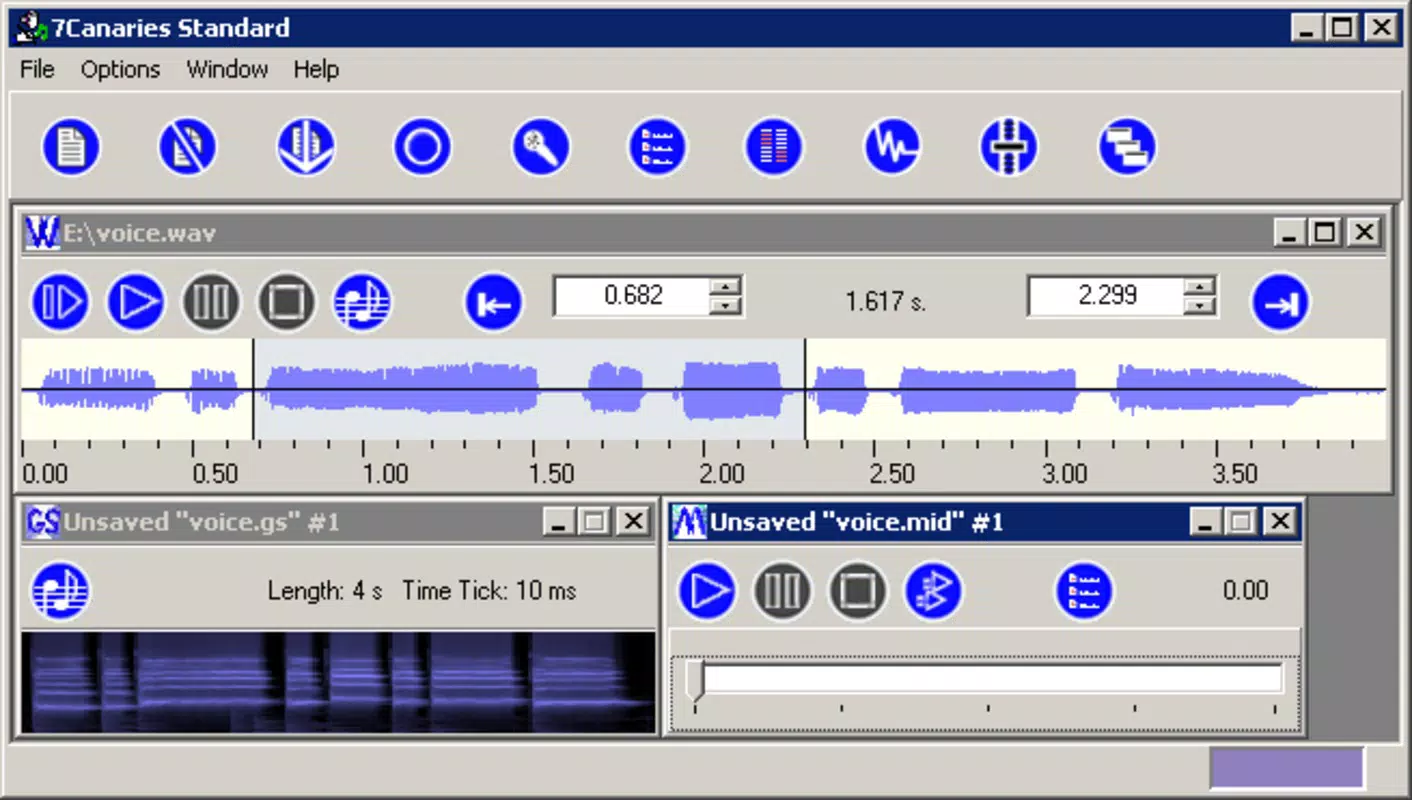
The user interface of 7Canaries Standard appears designed for functionality over visual flair, prioritizing access to core tools such as file selection, conversion settings, and real-time recording controls. Navigation is likely linear, with essential functions grouped into clearly labeled sections. The layout supports straightforward workflows: select audio input or file, choose instrument, initiate conversion, and export MIDI.
Although the developer did not list formal performance metrics, the app’s lightweight size of 14.3 MB suggests efficient resource usage. It is expected to run smoothly on a range of Android devices, including older models, due to its minimal system footprint. Responsiveness is likely consistent during file processing and real-time recording, though performance may vary slightly depending on device hardware and audio input quality.
Stability appears to be a consistent trait, given the app’s long release history. Users can expect reliable operation during standard tasks such as format conversion and audio capture. However, specific requirements for microphone sensitivity or audio input compatibility were not disclosed. The absence of visual feedback during conversion or real-time processing is noted as a limitation, but the app’s focus remains on core functionality rather than interactive design.
Platform Compatibility & Technical Requirements
7Canaries Standard is available exclusively on the Android platform. The current version is 2.3.0, released on April 9, 2005. The app has a file size of 14.3 MB, indicating a lightweight installation that does not strain device storage. The developer did not specify minimum OS requirements, nor did they list compatibility details for specific Android versions or device categories.
Given the app’s age, it may function on older Android systems, but its performance on newer devices cannot be confirmed without testing. The lack of updated compatibility information means users should exercise caution when installing on modern smartphones. The app is free to download and install, making it accessible to a broad audience without financial barriers.
Pros and Cons
Pros
- Specialized in audio-to-MIDI conversion with strong format support
- Real-time recording mode enables on-the-go music creation
- Over 100 instrument presets for diverse sound selection
- Lightweight file size (14.3 MB) ensures minimal storage impact
- Free to download and use, with no in-app purchases
Cons
- No built-in note editor for post-conversion MIDI editing
- Compatibility with modern Android versions not officially confirmed
- Developer did not provide performance benchmarks or system requirements
- Interface lacks modern visual polish and interactive feedback
- App has not been updated since 2005, raising concerns about long-term support
FAQ
Is 7Canaries Standard safe to download and install?
Yes, the app is free and available through official Android channels. As it does not require excessive permissions and has a stable history, it is considered secure for use on compatible devices.
Can I use 7Canaries Standard for live music recording?
Yes, the real-time recording mode allows users to capture audio via microphone or input source and convert it directly into MIDI format, making it suitable for live improvisation and field recording.
Does the app support editing MIDI files after conversion?
No, the app does not include a built-in note editor. Users must export MIDI files and edit them using external software such as DAWs or dedicated MIDI editors.
What audio formats does 7Canaries Standard support?
The app supports a range of formats, including MP3, WAVE, and audio CDs. Users can convert files from common sources without needing prior format conversion.
Is 7Canaries Standard compatible with the latest Android versions?
Compatibility with current Android systems has not been officially confirmed. While the app may run on modern devices, users should test it on their specific model to ensure functionality.
Final Thoughts
7Canaries Standard remains a unique and focused tool in the mobile music production landscape. Despite its age and lack of recent updates, its core functionality—audio-to-MIDI conversion with real-time recording—remains relevant for musicians and producers seeking a lightweight, no-frills solution. The app excels in converting instrumental tracks and offers a broad selection of instrument sounds, making it a valuable asset for creative workflows that rely on MIDI data.
While the absence of a note editor and outdated interface may deter some users, those who prioritize conversion accuracy and real-time input will find the app effective. Its free status and small size further enhance its appeal. For users working with older audio files or needing quick MIDI extraction, 7Canaries Standard delivers tangible value.
Download 7Canaries Standard now


